 Jade Note
 Now Supports ChatGPT Extensions: Open Your Notes Inside ChatGPT and Use Them Right There
Key points
- Jade Note now opens inside ChatGPT. You can find, read, attach, and edit notes without leaving ChatGPT.
- Even on Free and Plus plans, where ChatGPT Space is unavailable, you can open your own notes beside ChatGPT and work with them.
- Unlike ChatGPT Space, your notes are not locked inside ChatGPT. Claude, Muse, and other MCP-compatible AI tools can use the same notes.
Jade Note has long connected to ChatGPT through MCP, so you could ask ChatGPT to search your notes or write to them. With support for ChatGPT extensions, the Jade Note interface itself now opens inside ChatGPT. You can look at your notes with your own eyes and talk to ChatGPT about them at the same time.
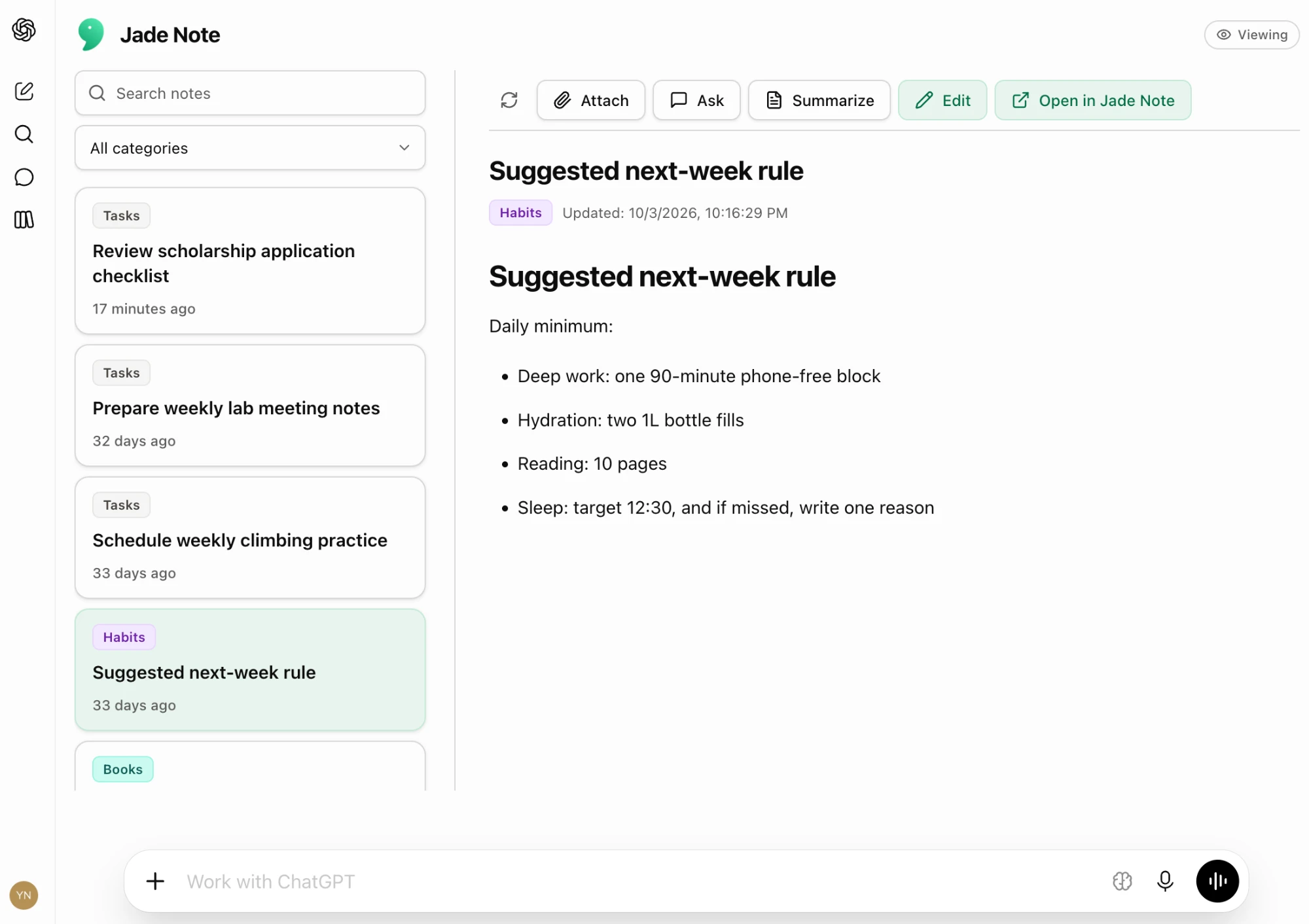
What you can do
- Find and read: Search by keyword or filter by category, then open a note. Headings, lists, checklists, and tables render as they do in Jade Note. Tags, flags, and related notes appear below the body.
- Bring notes into the conversation: Attach the note you are viewing with one click. No more copying and pasting the body.
- Edit in place: Rewrite the body in Markdown and save it. Whatever you decide with ChatGPT goes straight back into the note, without reopening Jade Note.
How this differs from ChatGPT Space
ChatGPT has a feature called ChatGPT Space, where you open pages and work on them together with ChatGPT. It is only available on the Pro, Business, and Enterprise plans, not on Free or Plus. With the Jade Note ChatGPT extension, Free and Plus users can also open their own notes inside ChatGPT, discuss them while reading, and write the results straight back.
The other big difference is that your notes are not locked inside ChatGPT.
ChatGPT Space is designed to be used within ChatGPT. Claude and other AI tools cannot read or write those pages directly.
Jade Note notes do not belong to any one AI. Revise a note in ChatGPT, then hand the same note to Claude to keep thinking it through. Collect notes with Muse, then organize them in ChatGPT. Grok Bot, Codex, Cursor, and other MCP-compatible AI agents can read and write the very same notes.
Switch AI tools, or move to a new one entirely, and everything you have built up stays where it is. The ChatGPT extension is simply the most convenient way to open those shared notes inside ChatGPT.
How to use it
Before you start
Add Jade Note from the ChatGPT directory (Apps / Plugins) and sign in with your Jade Note account. If you already use Jade Note in ChatGPT, you are ready to go.
As before, per-category access settings decide which notes ChatGPT can see. Notes in categories that block MCP access do not appear here either.
Two entry points
| Sidebar | In-conversation panel | |
|---|---|---|
| How to open | Open Jade Note from ChatGPT’s app list | Open the Jade Note panel within a conversation |
| Layout | On wide screens, the list and note body sit side by side | The list and note body appear in the conversation flow |
| Best for | Working through notes at length | Quickly checking a note mid-conversation |
From the in-conversation panel, the Open in sidebar button at the right end of the toolbar opens the same note in the sidebar (not shown on Android).
Toolbar buttons
When you open a note, buttons appear above the body. Labels follow ChatGPT’s language setting.
| Button | What it does |
|---|---|
| Reload (↻) | Reads the note again. Use it to pick up edits made on another device |
| Attach | Attaches the note you are viewing to the conversation |
| Ask | Attaches the note and starts a question in the message box |
| Summarize | Attaches the note and puts a summary request in the message box |
| Edit | Edits the body in Markdown. Save applies your changes; Cancel discards them |
| Open in Jade Note | Opens the note in the Jade Note web app |
Ask and Summarize only fill in the message box; they never send anything. You can rewrite the text before sending.
Pick a note with @
In the ChatGPT desktop app and Work Web, type @ in the message box to search Jade Note notes by title and pick one (not available on iOS or Android).
Wrapping up
With ChatGPT extension support, finding, reading, attaching, and writing back to your notes all happen inside ChatGPT. Even on plans without ChatGPT Space, you can keep your own notes beside you as you work, and those notes stay shared with every other AI you use.
New to Jade Note? Start with How to use Jade Note.