 Jade Note
FAQ
Frequently Asked Questions
Common questions about Jade Note features and plans, connecting to ChatGPT, and how your note data is handled.
General
MCP is the primary interface, not an add-on. Jade Note ships a hosted MCP server with OAuth 2.0, 26 tools, per-category access levels, and versioned writes — so you connect a URL instead of running a bridge script against a local app.
Both. Day to day it's an AI note app for casual notes via a Markdown editor. Share those notes over MCP with ChatGPT or Claude, and AI can read and write them as persistent memory. People and AI grow the same notes — that's the “memory layer” side.
Any AI agent that supports MCP (Model Context Protocol). Starting with Claude Desktop, MCP clients can read, write, search, link, and version notes with OAuth authentication.
Hardly any on Pro or Pro Trial. Catch up lets AI check and update freshness, consistency, importance, category Wikis, and link state.
New users get a 30-day Pro trial with 2,000 AI credits per month.
AI credits cover AI-powered processing. For example, Catch up uses credits when AI reviews and updates your notes, links, and category Wikis. The amount used depends on how much content Catch up processes.
AI features pause until the next monthly reset. Notes, categories, search, and settings stay available.
We're still in our early launch phase, so some features are in progress and there may be minor bugs. As we ship new features, fix issues, and launch mobile apps, we plan to raise the price gradually. We'd love to hear your feature requests and bug reports — feel free to reach out anytime.
ChatGPT
The Jade Note ChatGPT Plugin goes through OpenAI review every time we add or change a feature, and ChatGPT only picks up the change after it is approved. The review of our latest update is currently delayed, so the ChatGPT Plugin is significantly behind the current Jade Note MCP server. New features such as the improved note editing flow, batch operations, and comments are not available from the ChatGPT Plugin yet.
To use the latest features, add Jade Note to ChatGPT as a Custom MCP. The steps are in Jade Note under Settings → MCP Integration → Set up manually. It connects to the same Jade Note account, so there is nothing to migrate.
See What is the difference between the ChatGPT Plugin and a Custom MCP? for a comparison.
Check the following in order.
- Refresh the tool list. ChatGPT stores the tool list from when you added the Custom MCP and does not pick up new Jade Note features automatically. Follow How do I update my ChatGPT Custom MCP? to run Refresh.
- Start a new chat. An existing conversation can keep using the old tool definitions. After refreshing, start a new chat.
- Make sure the Custom MCP is the one being used. If you added both the ChatGPT Plugin and a Custom MCP, ChatGPT may be calling the Plugin. Select the Custom MCP (for example, "Jade Note(Custom)") for the chat, or disable the Plugin.
- Check your plan. Some features, such as Catch Up and undoing edits through version history, are available only on Pro or Trial.
- Check the category's MCP access. If the category is set to "Read-only for MCP" or "Hidden from MCP", AI tools cannot edit or see notes in it.
To bring new Jade Note features into your Custom MCP, reload its tool list (Refresh) in ChatGPT.
- Open ChatGPT in a web browser and open the list of apps (Plugins) you have added from Settings.
- Select your Jade Note Custom MCP (for example, "Jade Note(Custom)").
- Open the … menu next to Try in chat and click Manage.
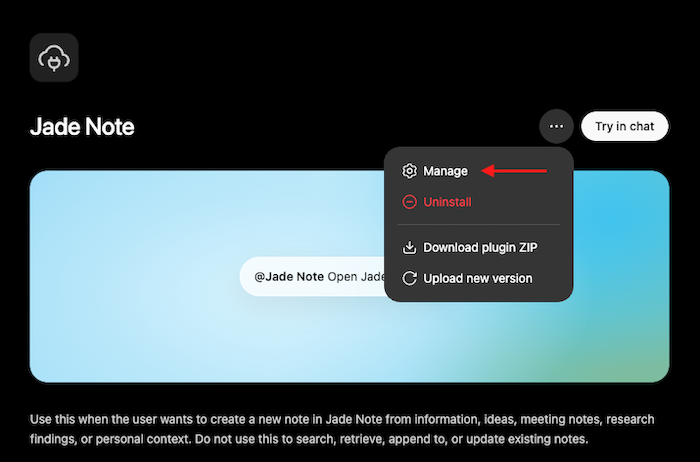
- Click Refresh next to Information.
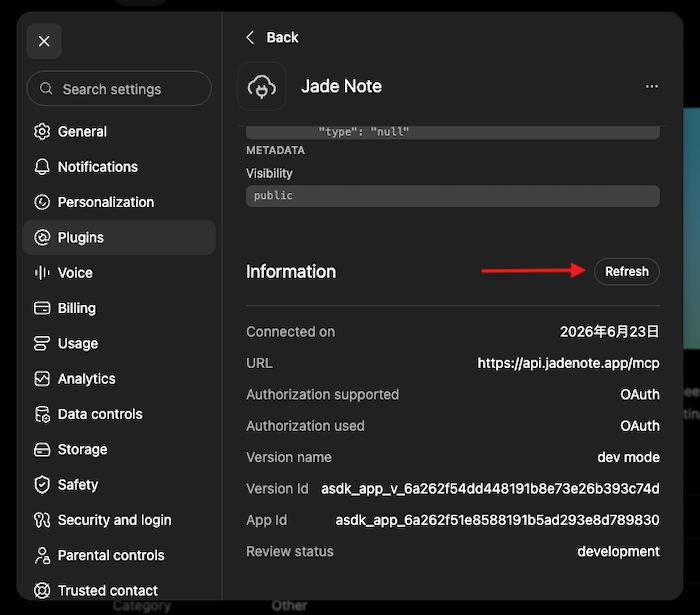
Note: Where the Refresh button appears may vary depending on your plan and other factors.
- Confirm that the tool list changed, then start a new chat.
If you cannot find Refresh, or the update does not show up, remove the Custom MCP and add it again using Settings → MCP Integration → Set up manually in Jade Note. Removing the Custom MCP from ChatGPT does not delete any Jade Note notes.
The ChatGPT Plugin is updated after OpenAI review, so there is nothing for you to update on that side.
Both connect to the same Jade Note account over OAuth and read and write the same notes. They differ in how you add them to ChatGPT and when new features reach you.
| ChatGPT Plugin | Custom MCP | |
|---|---|---|
| How to add | Install from the ChatGPT directory | Turn on developer mode and register the MCP server URL manually |
| New features | After OpenAI review (currently significantly delayed) | As soon as Jade Note ships them; requires a Refresh in ChatGPT |
| OpenAI review | Reviewed | Runs as an unreviewed custom app; ChatGPT shows a confirmation when you add it |
| Best for | Trying Jade Note quickly | Using the latest features (currently recommended) |
The Custom MCP server URL is https://api.jadenote.app/mcp. Developer mode may be unavailable depending on your ChatGPT account or workspace policy.
You can add both, but it becomes hard to tell which one ChatGPT is calling, so we recommend enabling only one. If the Plugin is already installed, the name "Jade Note" may be unavailable for the Custom MCP; use a name such as "Jade Note(Custom)".
Data & privacy
Yes. Set MCP access on each category to limit what AI tools connected over MCP, such as ChatGPT and Claude, can do with the notes in it.
| MCP access | What connected AI tools can do |
|---|---|
| Editable by MCP | Read, search, create, append, link, and update notes (default). |
| Read-only for MCP | Read and search notes, but not create or change them. |
| Hidden from MCP | Nothing. The category is invisible to MCP, including its name, notes, snippets, links, and Wiki content. |
Open the category's detail screen and change MCP access on the Info tab. The setting applies to every connected MCP client.
The Inbox, which holds notes without a category, is always "Editable by MCP" and cannot be changed. Move notes you do not want AI to see into a category set to "Hidden from MCP". See Categories for details.
No. Unless we separately ask for and receive your consent, Jade Note does not use your notes, chat messages, or other user content to train or improve AI models.
To provide AI features such as Catch Up, Insights, and semantic search, Jade Note may send note content to the AI providers it uses for processing. That processing is limited to providing the features you use.
When you connect external AI tools such as ChatGPT or Claude over MCP, note content those tools read is handled under each service's own terms and data settings. If you want to keep it out of training, check that service's data controls as well.
See "AI Processing and Model Training" in the Privacy Policy for details.